


Welcome back to the StoreLab Newsletter 👋
We’re back with another set of updates designed to make your Shopify mobile app more effective, from helping you build a stronger push audience to giving you deeper visibility into what’s driving engagement and sales.
August’s release introduces:
- A new Push Notifications Metrics tab in Analytics
- More tailored push opt-in journeys and messaging
- Behind-the-scenes improvements
We’ll walk you through what’s new, why it matters, and how these enhancements can help support stronger engagement, higher order values, and better UX for you and your customers.
Let’s get started!
Analytics | Push Tab
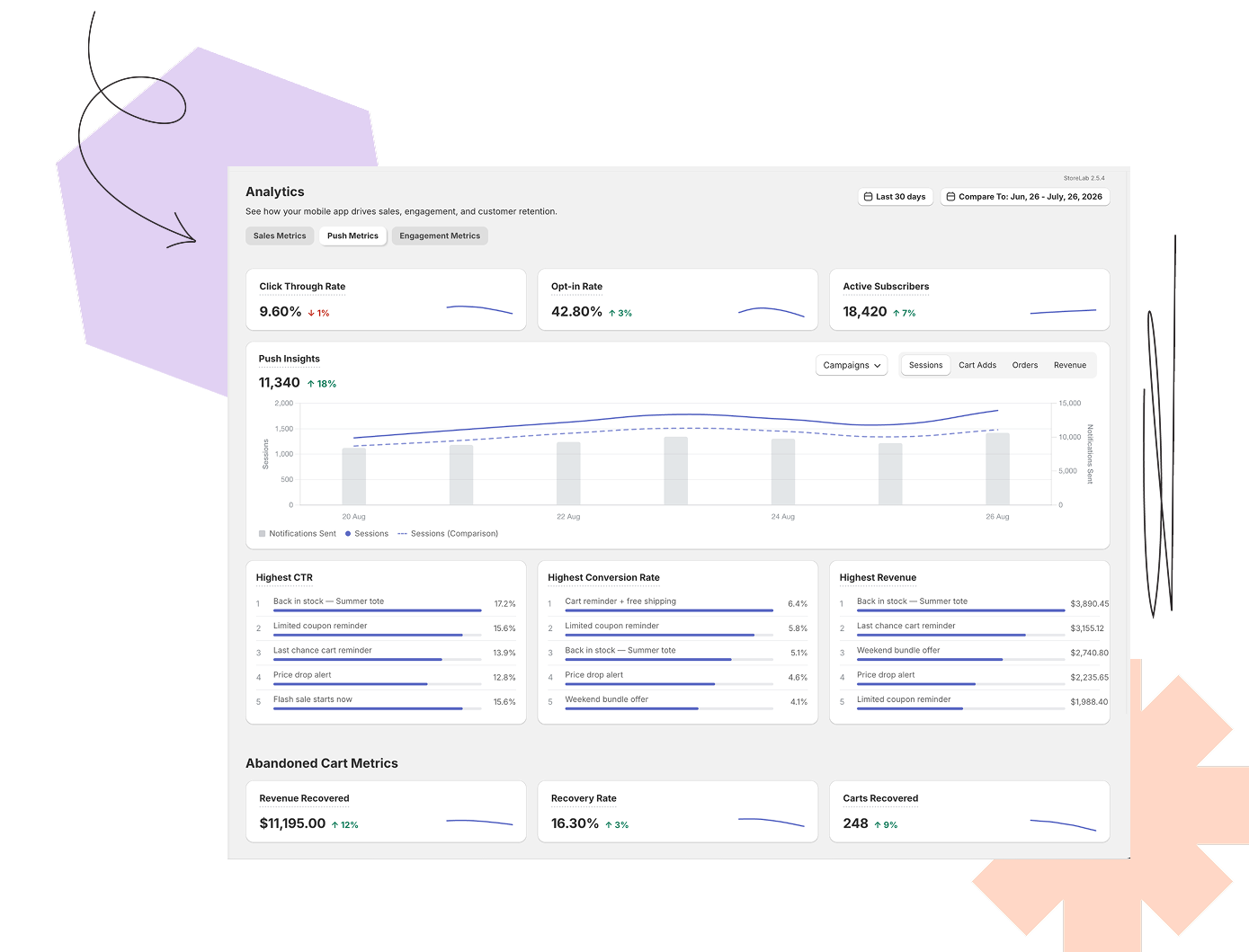
What did we change and what’s the value?
We’ve launched the Push Metrics tab in Analytics, giving you full visibility into how your push notifications are performing - enhancing the Analytics suite alongside Sales and Engagement, which we introduced earlier this year.
The Push Metrics tab brings everything together in one place, from high-level audience and engagement metrics to the performance of individual notifications, making it easier to understand what’s working and why.
It now highlights 4 key areas:
- Click-Through Rate & Opt-In Rate - how many customers are engaging with the notifications you send, and how many are opting in to receive them in the first place.
- Active Subscribers - how many customers are currently subscribed to push notifications, so you can track the health and growth of your reachable audience.
- Push Insights - a chart of overlaying notifications sent against sessions, cart adds, orders, and revenue, so you can see the direct impact of specific campaigns.
- Highest CTR, Conversion Rate & Revenue - a leaderboard of your best-performing notifications, so you can quickly see what’s resonating with customers and identify what to repeat.
What problem did this solve?
Every Shopify store owner has questions they can’t always answer. The Push Metrics tab gives you the data to answer them with confidence:
- Are my push notifications actually working? Push Insights brings sessions, cart adds, orders, and revenue directly alongside each notification. This way, you can see how customers respond to each campaign.
- Which notifications should I send more of? The Highest CTR, Conversion Rate, and Revenue leaderboards show you exactly which campaigns are resonating with customers.
- Is my push notification opt-in rate healthy? Opt-In Rate and Active Subscribers show you how many customers have opted in, how many you can currently reach, and whether that audience is growing.
- Is push driving real commercial impact? Revenue and orders sit next to notification activity, so you can connect which campaigns are contributing directly to sales.
Where can I find it?
Head to Analytics in the StoreLab dashboard and select the Push tab.
Enhanced Opt-In Journeys
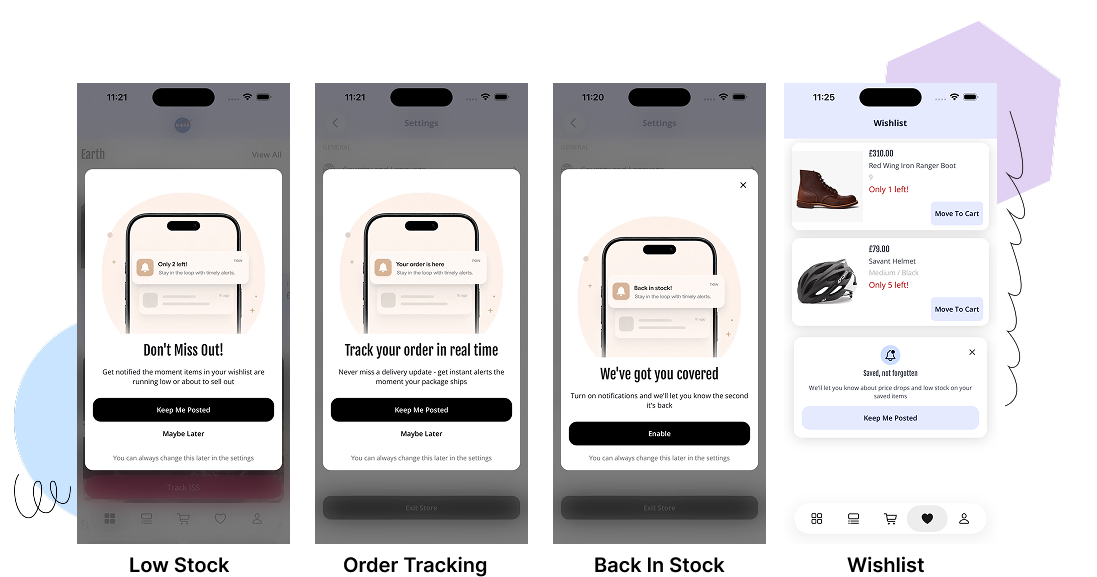
What did we change and what’s the value?
We’ve replaced the single, generic push notification opt-in prompt with a tailored system of opt-in journeys, triggered by what each customer actually does in your app - not simply when they open it.
Rather than asking every customer to opt in at the same moment, regardless of context, customers are now prompted at moments when they’re most likely to see the value and say yes:
- Post-purchase - customers are prompted right after completing an order, when satisfaction is high and the value of receiving order updates is clear.
- Back-in-stock subscribe - customers who’ve already asked to be notified about a specific product are prompted to opt in to push at the same moment, when their purchase intent is clearest.
- Wishlist - customers who’ve saved multiple items are prompted once they’ve shown genuine interest, instead of on their first visit.
- Homepage & Wishlist soft-asks - lower-pressure, dismissable prompts that give customers the chance to experience the value of your app before asking them to opt in.
There’s also a lot happening behind the scenes to make sure these prompts feel helpful, not repetitive. Customers will never see more than one opt-in prompt in a day, and if they dismiss one, they won’t be asked again for 14 days.
Back-in-stock is the one exception: because the customer has explicitly asked to be notified about a product, that prompt isn’t subject to the cooldown.
What problem did this solve?
Push notifications are one of the most powerful retention tools available in your app. The more customers who opt in, the larger the audience you can reach and engage with every campaign you send.
By introducing journey-driven prompts, customers are now asked at key moments when the value of enabling notifications is clear and relevant to what they’re doing in the app. This makes the experience feel more natural and less disruptive, helping increase opt-in rates while giving you a better audience to re-engage, convert, and retain over time.
Where can I find it?
The new onboarding experience is now live automatically across your app, with no setup or changes required.
💡Merchant Growth Tip - How can you increase your push notification opt-in rate?
The message customers see when being asked for permission to receive push notifications can make a significant difference to opt-in rates. Instead of leading with a generic request, lead with what’s in it for the customer - whether that’s early access to new launches, back-in-stock alerts, or exclusive offers. This way, they’re more likely to say yes to opting in and stay engaged with your app over time.
Behind The Scenes
Alongside this month’s bigger feature releases, we’ve also been making improvements behind the scenes to keep the platform running smoothly:
- Refined the UX across your most frequently used features, making everyday tasks simpler and more intuitive.
- Fixed bugs and made stability improvements across the mobile experience for a smoother, more reliable app.
These updates keep your app fast, dependable, and ready to support your day-to-day ecommerce activity.
What’s Next?
Liquid Glass
Apple’s latest design guidelines introduce new requirements and restrictions - but also leave a big opportunity.
We’re now updating the app’s UI to align with Apple’s new Liquid Glass standard, and the result is a genuinely beautiful refresh across the board: cleaner surfaces, more depth, and a more polished, native feel throughout the entire customer experience.
Order Tracking
“Where is my order?” is one of the most common questions your customers ask - and one of the easiest to solve.
We’re building dedicated order tracking, with post-purchase notifications and a much-improved UI/UX so customers can follow from checkout to delivery. The goal is simple: give customers the information they need, exactly when they need it, without them having to ask.
Keep an eye out for future announcements!
Before You Go!
If you have any questions about these latest enhancements and feature releases, feel free to reach out to your Account Manager who can go into more detail or will connect you with the relevant team member. This way, you can be sure to make the most of every opportunity to grow through your Shopify mobile app.
Or if you’ve landed here looking for ways to achieve sustainable Shopify revenue growth, book a call with one of our friendly experts at StoreLab. We’d love to learn more about your business and how we can help you to reach your full sales potential.

Skyrocket your Shopify sales with a no-code Apple & Android mobile app. Available now on the Shopify app store.









.webp)

