

With so many ecommerce stores competing for attention, standing out and keeping customers engaged is more challenging than ever. That’s where push notification marketing comes in!
Push notifications give you a direct way to reach your audience: reminding shoppers about abandoned carts, alerting them to new arrivals, or sharing exclusive deals.
In this article, we’ll discuss what push notifications are, how they work, the different types you can use, their benefits, and how to use them effectively. We’ll also show you how to create the most engaging push notification campaigns possible, so your messages capture attention, increase purchases, and keep your customers coming back.
What is a push notification?
Push notifications are one of the easiest (and most effective) ways to connect with your customers and grow sales.
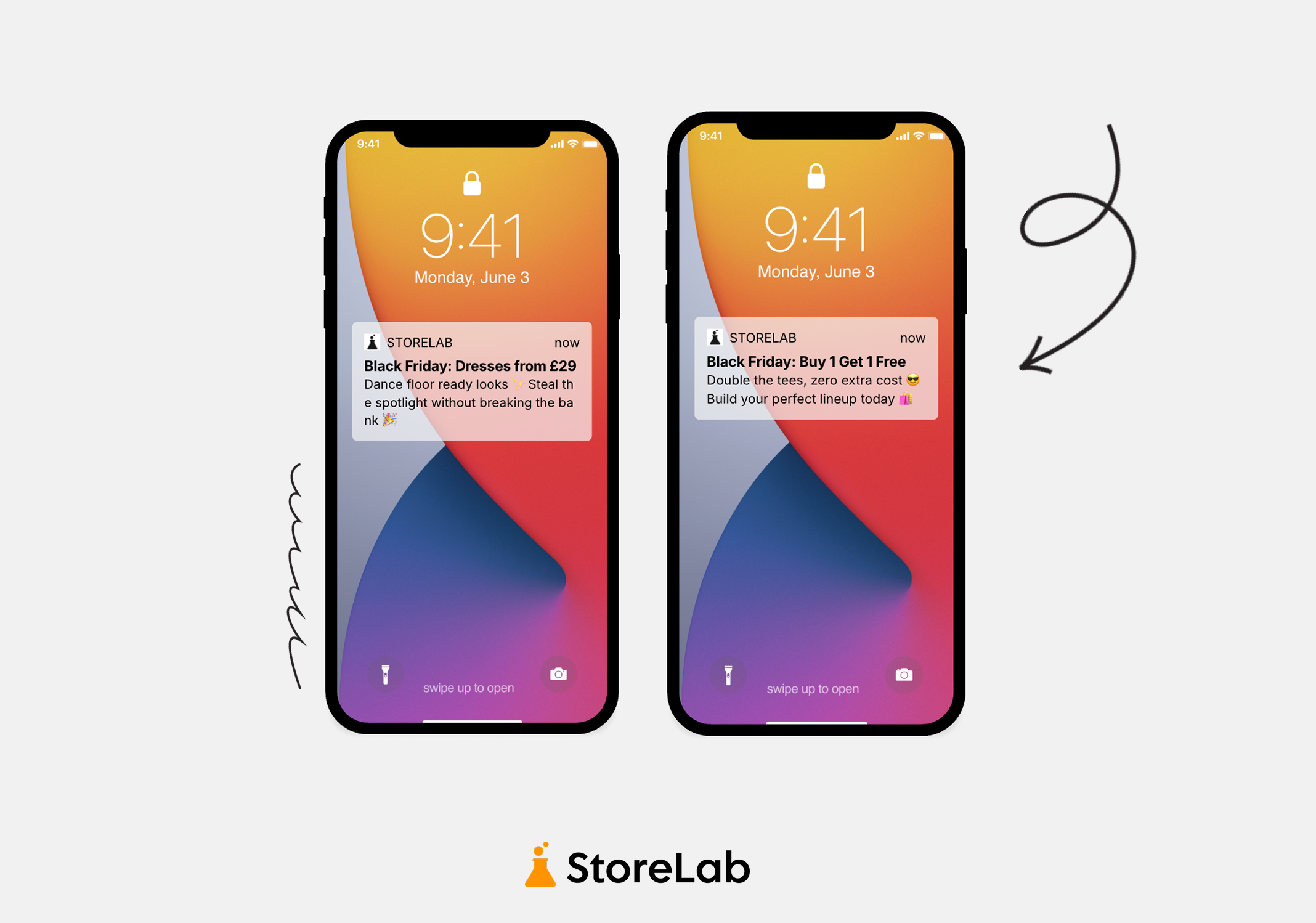
But what exactly is the meaning and definition of push notifications? Simply put, push notifications are messages sent directly to a user’s device, appearing on the lock screen or in the notification center. Unlike in-app messages, they can reach users even when they’re not actively using the app.
These opt-in alerts can display text, images, or buttons, promoting people to take specific actions, like checking out a new product or completing a purchase.
There are two forms: web push notifications and app push notifications. While both are used in ecommerce, in 2026, push notifications are more commonly associated with mobile apps, as this is where brands are increasingly focusing their efforts to connect with customers.

What is the purpose of push notifications?
Push notifications are short, clickable messages that pop up right on a user’s mobile device from an app. For ecommerce and Shopify businesses, they’re a powerful way to engage customers, increase store traffic, and boost sales by sending timely updates and personalized offers straight to your customers’ screens.
Appearing directly on a customer’s screen is one of the closest ways you can reach them without being overly invasive, while still offering something genuinely useful or valuable.
In ecommerce, push notifications are commonly used for purposes like marketing messages, product information, order updates, and promotions - all designed to keep customers informed, engaged, and also excited. We’ll dive into these different uses in a bit more detail later in the article!
Push notification marketing is more important than ever because mobile shopping is now the go-to way for consumers to research products, shop, and interact with brands. This is especially true for Shopify stores, with a huge 79% of Shopify traffic coming from mobile devices.
With smartphones glued to our hands for most of the day, people are constantly using mobile apps to browse products, shop, and connect with brands. As shoppers spend more time on their phones than on desktop, push notifications offer an engaging and immediate way to connect with them.
Since these messages land right on a customer’s home screen, they’re pretty hard to miss, making it easier to catch their attention and give them a little reminder about what you’ve going on. With the amount of competition ecommerce and Shopify stores are facing, this is going to be crucial.

How do push notifications work?
Before you can send push notifications, customers have to opt in to receive them. But don’t worry - it’s usually not too hard to get people on board.
On average, 67.5% of mobile app users choose to receive push notifications.
Shoppers are happy to opt in when there’s a clear benefit, like being notified when an item is back in stock, when a sale goes live, or when a new collection drops.
Once someone opts in, push notifications rely on a delivery system that ensures messages reach shoppers at the right time. They can be triggered by user actions - like completing a milestone, abandoning a cart, or clicking a restock alert - or they can be sent as scheduled campaigns.
Within many ecommerce mobile app builders, notifications can be created, managed, segmented, and sent all from one central place. For Shopify stores, no-code mobile app builders (like ours at StoreLab) makes this super easy, offering both the tools and services to handle push notification campaigns effectively.
Push notifications work wonders because they combine permission, timing, and personalization, giving your customers helpful updates and true value whilst keeping them connected to your brand. It’s a win-win.
What are the different types of push notifications?
There are several different types of push notifications used in ecommerce, and while you don’t need to use all of them, each type has its own unique purpose. Depending on your store and customer base, some types may resonate more than others - helping you tailor your messages to what will bring the most engagement and grow Shopify sales.
Transactional
Automated messages triggered by a customer’s interaction with your store, like placing an order. They keep customers updated with important details such as order confirmations, tracking links, and shipping updates.
Marketing
Designed to engage customers, promote products, and drive sales through your ecommerce or Shopify mobile app. Perfect for highlighting special offers, product launches, or personalized recommendations.
Promotional
Highlight sales, discounts, or limited-time offers to create excitement and drive impulse purchases.
Reminders
Encourage customers to take action based on their activity in your store. Examples include cart reminders, expiring discount alerts, or prompts to reorder products they’ve bought before.
Informational
Keep customers updated on important non-promotional messages, such as holiday delivery times, app maintenance, or returns & policy updates; this helps everyone stay in the loop and strengthens trust.
Behavioral (Triggered)
Sent based on user actions, like abandoned carts or product browsing, to recover potential lost sales and guide customers toward completing a purchase.
Personalized Recommendations
Suggesting products based on purchase history, browsing behavior, or preferences to make recommendations feel relevant.
Re-engagement
Encourage inactive users or customers that haven’t shopped with you in a while to return with special offers, reminders, or incentives (could be as simple as free shipping!), helping reduce churn and increase retention.
Inventory & Price Alerts
Notify customers when items are back in stock, running low, or have a price drop - creating urgency and encouraging quick purchases.
Event-Based Notifications
Sent for milestones, special events, anniversaries, holidays, or seasonal campaigns to match trends, show thoughtfulness, and increase customers loyalty.
Location-Based Notifications
Target app users based on their geographic location to promote nearby stores, local events, or in-store offers.
Broadcast
Sent to all users at once, typically for big announcements or general promotions, helping ensure everyone gets the message.
Segmented
Sent to specific customer groups based on demographics, purchase history, or engagement patterns - allowing you to tailor content to the right audience.

What are the benefits of push notifications?
Cost & time-effective marketing tool
Compared to marketing channels like paid ads or email campaigns (which are of course still important!) push notifications are incredibly effective in both time and cost. They’re super low-investment, yet deliver instant results and reach - no ongoing ad spend or hours spent writing new emails.
Fast, effective customer communication
Unlike emails that can easily get buried in crowded inboxes, push notifications appear right away on a customer’s device, allowing you to communicate quickly and directly. They’re perfect for flash sales, limited-time offers, or urgent updates.
Similar to SMS messaging, a device, browser, or app doesn’t even need to be powered on for the notification to be delivered. This immediacy often results in higher open rates than email. While emails usually see click-through rates of just 1-2%, push notifications average around 28%, which is pretty impressive.
Increased customer engagement & loyalty
Push notifications keep your audience engaged by sending timely updates, personalized offers, and gentle reminders to return to your store. By consistently sharing relevant content, you build stronger connections with your customers and build loyalty.
For example, sending membership anniversary discounts or exclusive app-only offers makes customers feel valued and more likely to continue shopping with you.
Improved customer retention
Re-engagement messages and personalized alerts are a highly effective way to reduce churn by bringing customers back to your store. These notifications help turn one-time buyers into repeat customers, keeping your audience active and engaged.
Push notifications are especially valuable as a marketing channel because retaining existing customers is far more cost-effective than acquiring new ones - the cost of acquiring a new customer can be up to 5-7x higher than retaining one. So by using push notifications to focus on retention, you can maximise Shopify revenue while minimizing marketing spend.
Valuable data & insights
Every push notification you send provides valuable information about your customers’ behavior and preferences. By analyzing open rates, click-through rates, and which notifications actually drive action, you can refine your messaging to ensure future campaigns match your audience’s interests.
These insights can also be used to inform your overall content strategy and improve marketing effectiveness.
Enhanced user experience
Push notifications make the shopping experience smoother by sending helpful updates directly to your customers’ devices. Whether it’s an order confirmation, a shipping update, or a back-in-stock alert, notifications keep customers informed and saves them the work of searching for information manually.

Best practices for push notifications
Optimize opt-in requests
Encourage app users to enable notifications at the most natural moments - like right after making a purchase, or while exploring key features of your app. Using pre-permission prompts can highlight the benefits of opting in, such as getting order updates, restock alerts, exclusive offers, or early access to your Shopify Black Friday Cyber Monday sale.
Create urgency
Tapping into a sense of urgency is a highly effective way to boost in-app purchases. Limited-time offers, countdowns, or flash sales trigger FOMO (fear or missing out), persuading customers to act quickly.
And the stats back it up: 70% of consumers make impulse purchases due to limited-time offers.
For example: “Hurry! 24 hours left to get 20% off all coats & jackets!”. This works especially well during peak shopping events when consumers are actively hunting for deals.
Send timely notifications
Timing is crucial. Send notifications when customers are most likely to engage, such as during busy shopping hours, lunch breaks, or just before bed; this way, you’re grabbing their attention at the perfect moment.
Personalize messages
Even small touches, like using a customer’s name, make messages feel personal. Tailor notifications based on past purchases, browsing habits, or preferences to make offers relevant rather than generic.
Use social proof
Showing that other customers trust and love your products builds confidence. So in your push notification visuals and copy, highlight popular products, share quick testimonials, or note how many people are taking advantage of an offer.
Social proof within push notifications reduces purchase hesitation, with 93% of shoppers saying reviews influence their buying decisions.
Run re-engagement campaigns
Bring back inactive users with notifications about new arrivals, special offers, or loyalty points waiting to be redeemed. For example: “We miss you! Here’s 10% off your next order - come see what’s new!”
Offer incentives
Let’s be real, everyone loves a good perk! 81% of consumers say they’re more likely to engage with brands offering incentives. Push notifications with incentives motivate customers to take action, perhaps even make a purchase they wouldn’t have made otherwise.
Send cart abandonment reminders
Cart reminders are an effective way to recover lost sales. Gentle push notifications about items left behind can convince customers to come back and complete their purchase, especially when paired with incentives.
Since abandoned carts are a major pain point for Shopify and ecommerce store owners, this strategy can make a significant difference in maintaining a steady Shopify revenue stream.
Read our guide to learn more about how to reduce and recover Shopify abandoned carts.
Introduce new products & collections
Push notifications are ideal for creating excitement around new arrivals or seasonal collections. Alerting customers as soon as new items drop gives them a sense of exclusivity and keeps them engaged.
Test and refine campaigns
Continuously A/B test messaging, formats, and timing to see what resonates with your audience. Monitor metrics like open rates and conversions to optimize future notifications and improve overall results.
Don’t overdo it!
Finally, don’t overdo it! While push notifications are a powerful marketing tool, sending too many can annoy customers. Focus on quality over quantity - make every message count by offering real value and thoughtful content that your audience will appreciate.

Best apps for Shopify push notifications to increase sales
To send push notifications, you’ll need a dedicated mobile app for your Shopify store; it acts as the bridge that connects your products straight to your customers’ phones. With a mobile app, you can create and schedule notifications, segment your audience, personalize messages, and even automate campaigns based on customer behavior - all from one central dashboard.
Having a mobile app puts your brand directly in your customers’ pockets, making shopping faster and easier. In fact, 85% of shoppers prefer apps over mobile websites, and they add 4.2x more products to their baskets.
At StoreLab, our no-code Shopify mobile app builder is designed to make all of this simple. What’s more, our plans take a holistic approach to Shopify growth - your app and push notifications work hand in hand with Meta ads, email marketing flows, and creative such as high-converting landing pages to acquire and retain customers, keeping your revenue flowing and growing. Find out more by clicking here.
Get in touch with a member of our team at StoreLab today. We’d love to explore how we can help your business grow!
Push Notifications FAQ
What are push notifications?
Push notifications are short, clickable messages sent directly to a user’s device from a mobile app or website. They appear on the lock screen or notification center and allow brands to share updates, promotions, or important information even when the user isn’t actively using the app.
What are the benefits of push notifications?
The benefits of push notifications are that they help businesses communicate instantly with customers, increase engagement, drive more sales, and for Shopify stores, grow sustainable revenue. They’re a cost-effective marketing channel that delivers messages directly to users’ devices, often resulting in higher open and click-through rates than email. They also improve retention, provide useful customer insights, and enhance the overall shopping experience.
What are the different types of push notifications?
There are several different types of push notifications used in ecommerce:
- Transactional
- Marketing
- Promotional
- Reminders
- Informational
- Behavioral (Triggered)
- Personalized Recommendations
- Re-Engagement
- Inventory & Price Alerts
- Event-Based Notifications
- Broadcast
- Segmented
When should I send push notifications?
Push notifications should be sent when they provide real value to customers. Common examples include announcing sales, notifying customers about restocked products, sending cart abandonment reminders, or sharing order updates. Timing also matters - push notifications often perform best during peak mobile usage times such as lunch breaks, evenings, or when customers are most active.
How do I set up push notifications?
To send push notifications, you need a mobile app or platform that supports them. For Shopify stores, this typically means using a no-code Shopify mobile app builder like StoreLab that allows you to create, schedule, segment, and automate notifications from a single dashboard once customers have opted in.
How do Shopify push notifications increase sales?
Shopify push notifications increase sales and revenue by bringing customers back to your store with timely reminders, personalized offers, and alerts about promotions or restocked products. By reaching customers directly on their phones, brands can recover abandoned carts, promote new collections, and encourage repeat purchases.
What is the difference between SMS/text messages and push notifications?
SMS messages are sent to a customer’s phone number through the mobile network and appear in the device’s messaging app as a text conversation. Push notifications, on the other hand, are sent through a mobile app to users who have opted in to receive them.
They appear directly on a user’s device - such as on the lock screen, notification center, or as a banner - and can include visuals like images, icons, or buttons that encourage users to click and check out your offerings. This makes push notifications a highly engaging way for brands to share updates, promotions, and product alerts directly on a customer’s screen.

Skyrocket your Shopify sales with a no-code Apple & Android mobile app. Available now on the Shopify app store.







.webp)

